
The following diagrams explain each part of the BlackVue dashcam.
Front camera
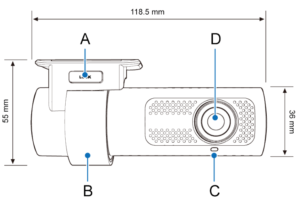
A) Lock button
B) Mounting bracket
C) Front security LED:
 : Lights on during (i) normal mode, (ii) an event is being recorded (impact detected), (iii) manual recording has started, or (iv) motion is detected in parking mode.
 : Blinks slowly during parking mode motion detection standby.
D) Camera lens
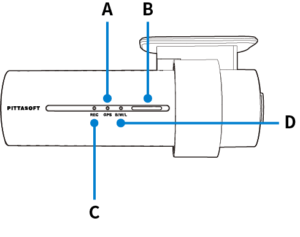
A) GPS LED:
 : Lights blue when GPS is on.
 : Blinks blue quickly when GPS is turning off.
B) Speaker
C) Recording LED:
 : Lights orange in normal mode.
 : Lights red when (i) an event is being recorded (impact detected), or (ii) manual recording has started.
 : Lights green in parking mode when motion is detected.
D) Bluetooth/ Wi-Fi/ LTE LED:
 : Lights yellow when LTE is connected.
: Lights white when Wi-Fi is connected.
 : Blinks Yellow slowly when Bluetooth is paired.
 : Blinks Yellow quickly when Bluetooth is in pairing mode.

A) Proximity Sensor LED:
: Lights when proximity sensor is triggered.
B) Proximity Sensor:
Touch or wave a finger within 20mm of the sensor to trigger a customizable function.
• Available options:
– Turn on/off audio recording (default)
– Manual recording trigger
– Off

A) Micro USB port
B) DC in (power connector)
C) microSD card slot
D) Wi-Fi button: Press once to turn on/off Wi-Fi.
E) Cover
Removing and inserting the front camera

A) Connectivity details label: Default Wi-Fi SSID / Default Wi-Fi password / Cloud code / QR code
B) Serial number label
• To remove the dashcam from its bracket, press the LOCK button and pull the dashcam out of the mounting bracket.
• To insert the dashcam into its bracket, push the dashcam into the mounting bracket until it “clicks” in.
Interior/DMS camera
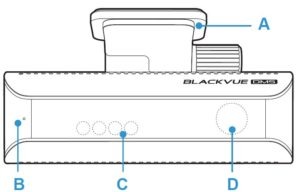
A) Mounting bracket
B) Indicator LED
: Light Blue in Calibration
: Light Green in Normal mode
: When DMS event detecte, Light Red is turned on
C) IR LED (Inside)
D) Camera lens (Inside)
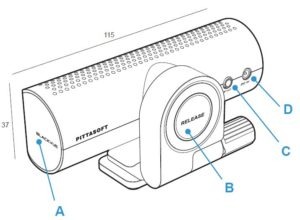
A) Turn on/off audio beep
B) Push botton
C) Front camera connection port
D) DC in


