The following diagrams explain the different parts of the BlackVue Ultra Battery B-130A.
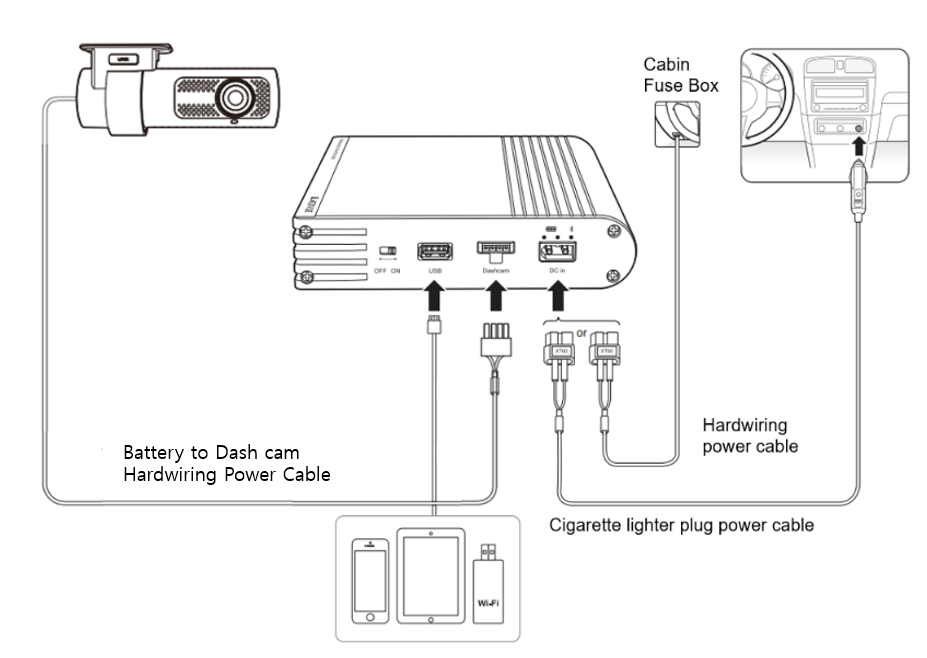
For specific instructions on installation with hardwired power cables, see “FAQs-B-130A”
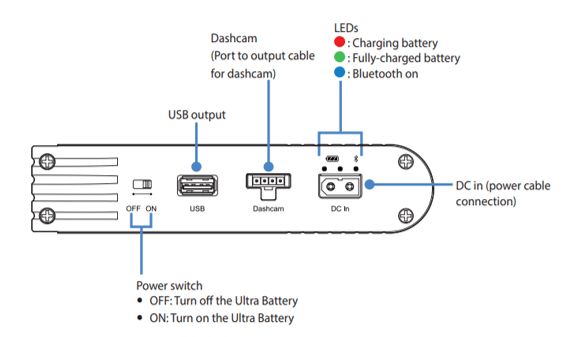
->LED indicator and beeps
| LEDs | Sound alert | ||
| Power on |  |
All 3 LEDs turn on together and then turn off one by one |
Welcome chime |
| Started charging |  |
Red LED blinks for 5 seconds | Beeps once |
| Charging |  |
Red LED is on | |
| Fully charged |  |
Green LED is on | |
| Bluetooth connected |  |
Blue LED is on | |
| Low input voltage warning/ High input voltage warning |
  |
Red and Green LED blink together | Beeps twice(Repeate) |
| Overheated warning |   |
Red LED and Green LED blink one after another |
Beeps twice(Repeate) |
*The beeping sound can be activated via Bluetooth using the BlackVue app.
*The welcome chime and the beeping sound for the overheated warning cannot be muted for safety reasons.
Addition Feature.
- Approximately 30 hours of power from 50 minutes of charging by hardwired installation / 90 minutes of charging by plug-in installation (based on a dashcam that uses 3W)
- Compatible with 2 installation methods:
- Plug-in installation: Simply plug in the cigarette lighter plug power cable (standard 5A charging);or
- Hardwired installation: Connect the hardwiring power cable for faster charging (rapid 9A charging).
- Configure settings via Bluetooth with the BlackVue app.
- Compatible with both car (12V) and heavy vehicle (24V) electrical systems.
- Battery protection circuitry for increased safety and extended battery life.
- Simultaneously charge your Ultra Battery and power your dashcam while driving.
- Power output automatically switches to draw power from the Ultra Battery when the engine is off.
- Battery cycle life: Designed to retain more than 80% of its original capacity after 1,500 complete charge/discharge cycle
Temperature Cut-off Functions:
- High Temperature: Shuts down the battery's charging power if the internal temperature reaches 80℃ (176℉) or above.
- Low Temperature: Shuts down the battery's charging power if the temperature reaches below 0℃ (32℉).
- One USB port (5V) allows you to simultaneously charge another device (smartphone, mobile Wi-Fi hotspot, etc.) while powering the dashcam.